[Spring] 파일 입출력 (commons-io)
🌿파일 업로드 설정
pom.xml
<?xml version="1.0" encoding="UTF-8"?>
<project xmlns="http://maven.apache.org/POM/4.0.0"
	xmlns:xsi="http://www.w3.org/2001/XMLSchema-instance"
	xsi:schemaLocation="http://maven.apache.org/POM/4.0.0 https://maven.apache.org/maven-v4_0_0.xsd">
	<modelVersion>4.0.0</modelVersion>
	<groupId>com.test</groupId>
	<artifactId>file</artifactId>
	<name>FileTest</name>
	<packaging>war</packaging>
	<version>1.0.0-BUILD-SNAPSHOT</version>
	<properties>
		<java-version>11</java-version>
		<org.springframework-version>5.0.7.RELEASE</org.springframework-version>
		<org.aspectj-version>1.6.10</org.aspectj-version>
		<org.slf4j-version>1.6.6</org.slf4j-version>
	</properties>
	<dependencies>
		<!-- Spring -->
		<dependency>
			<groupId>org.springframework</groupId>
			<artifactId>spring-context</artifactId>
			<version>${org.springframework-version}</version>
			<exclusions>
				<!-- Exclude Commons Logging in favor of SLF4j -->
				<exclusion>
					<groupId>commons-logging</groupId>
					<artifactId>commons-logging</artifactId>
				</exclusion>
			</exclusions>
		</dependency>
		<dependency>
			<groupId>org.springframework</groupId>
			<artifactId>spring-webmvc</artifactId>
			<version>${org.springframework-version}</version>
		</dependency>

		<!-- AspectJ -->
		<dependency>
			<groupId>org.aspectj</groupId>
			<artifactId>aspectjrt</artifactId>
			<version>${org.aspectj-version}</version>
		</dependency>

		<!-- Logging -->
		<dependency>
			<groupId>org.slf4j</groupId>
			<artifactId>slf4j-api</artifactId>
			<version>${org.slf4j-version}</version>
		</dependency>
		<dependency>
			<groupId>org.slf4j</groupId>
			<artifactId>jcl-over-slf4j</artifactId>
			<version>${org.slf4j-version}</version>
			<scope>runtime</scope>
		</dependency>
		<dependency>
			<groupId>org.slf4j</groupId>
			<artifactId>slf4j-log4j12</artifactId>
			<version>${org.slf4j-version}</version>
			<scope>runtime</scope>
		</dependency>
		<dependency>
			<groupId>log4j</groupId>
			<artifactId>log4j</artifactId>
			<version>1.2.17</version>
		</dependency>

		<!-- @Inject -->
		<dependency>
			<groupId>javax.inject</groupId>
			<artifactId>javax.inject</artifactId>
			<version>1</version>
		</dependency>

		<!-- Servlet / JSP -->
		<dependency>
			<groupId>javax.servlet</groupId>
			<artifactId>javax.servlet-api</artifactId>
			<version>3.1.0</version>
			<scope>provided</scope>
		</dependency>
		<dependency>
			<groupId>javax.servlet.jsp</groupId>
			<artifactId>javax.servlet.jsp-api</artifactId>
			<version>2.3.3</version>
			<scope>provided</scope>
		</dependency>
		<dependency>
			<groupId>javax.servlet</groupId>
			<artifactId>jstl</artifactId>
			<version>1.2</version>
		</dependency>

		<!-- Test -->
		<dependency>
			<groupId>junit</groupId>
			<artifactId>junit</artifactId>
			<version>4.12</version>
			<scope>test</scope>
		</dependency>

		<!-- Lombok -->
		<dependency>
			<groupId>org.projectlombok</groupId>
			<artifactId>lombok</artifactId>
			<version>1.18.28</version>
			<scope>provided</scope>
		</dependency>

		<dependency>
			<groupId>org.springframework</groupId>
			<artifactId>spring-test</artifactId>
			<version>${org.springframework-version}</version>
		</dependency>

		<!-- AOP -->
		<dependency>
			<groupId>org.aspectj</groupId>
			<artifactId>aspectjrt</artifactId>
			<version>${org.aspectj-version}</version>
		</dependency>

		<dependency>
			<groupId>org.aspectj</groupId>
			<artifactId>aspectjweaver</artifactId>
			<version>${org.aspectj-version}</version>
		</dependency>

		<!-- JSON -->
		<dependency>
			<groupId>com.fasterxml.jackson.core</groupId>
			<artifactId>jackson-databind</artifactId>
			<version>2.15.0</version>
		</dependency>

		<dependency>
			<groupId>com.fasterxml.jackson.dataformat</groupId>
			<artifactId>jackson-dataformat-xml</artifactId>
			<version>2.15.0</version>
		</dependency>

		<dependency>
			<groupId>com.google.code.gson</groupId>
			<artifactId>gson</artifactId>
			<version>2.10.1</version>
		</dependency>

		<!-- HikariCP -->
		<dependency>
			<groupId>com.zaxxer</groupId>
			<artifactId>HikariCP</artifactId>
			<version>2.7.4</version>
		</dependency>

		<!-- MyBatis -->
		<dependency>
			<groupId>org.mybatis</groupId>
			<artifactId>mybatis</artifactId>
			<version>3.5.2</version>
		</dependency>

		<dependency>
			<groupId>org.mybatis</groupId>
			<artifactId>mybatis-spring</artifactId>
			<version>1.3.2</version>
		</dependency>

		<dependency>
			<groupId>org.springframework</groupId>
			<artifactId>spring-tx</artifactId>
			<version>${org.springframework-version}</version>
		</dependency>

		<dependency>
			<groupId>org.springframework</groupId>
			<artifactId>spring-jdbc</artifactId>
			<version>${org.springframework-version}</version>
		</dependency>

		<!-- log4jdbc.log4j2 -->
		<dependency>
			<groupId>org.bgee.log4jdbc-log4j2</groupId>
			<artifactId>log4jdbc-log4j2-jdbc4</artifactId>
			<version>1.16</version>
		</dependency>

		<!-- commons io -->
		<dependency>
			<groupId>commons-io</groupId>
			<artifactId>commons-io</artifactId>
			<version>2.11.0</version>
		</dependency>

	</dependencies>
	<build>
		<plugins>
			<plugin>
				<artifactId>maven-eclipse-plugin</artifactId>
				<version>2.9</version>
				<configuration>
					<additionalProjectnatures>
						<projectnature>org.springframework.ide.eclipse.core.springnature</projectnature>
					</additionalProjectnatures>
					<additionalBuildcommands>
						<buildcommand>org.springframework.ide.eclipse.core.springbuilder</buildcommand>
					</additionalBuildcommands>
					<downloadSources>true</downloadSources>
					<downloadJavadocs>true</downloadJavadocs>
				</configuration>
			</plugin>
			<plugin>
				<groupId>org.apache.maven.plugins</groupId>
				<artifactId>maven-compiler-plugin</artifactId>
				<version>2.5.1</version>
				<configuration>
					<source>11</source>
					<target>11</target>
					<compilerArgument>-Xlint:all</compilerArgument>
					<showWarnings>true</showWarnings>
					<showDeprecation>true</showDeprecation>
				</configuration>
			</plugin>
			<plugin>
				<groupId>org.codehaus.mojo</groupId>
				<artifactId>exec-maven-plugin</artifactId>
				<version>1.2.1</version>
				<configuration>
					<mainClass>org.test.int1.Main</mainClass>
				</configuration>
			</plugin>
		</plugins>
	</build>
</project>
apache의 commons-io의 dependency를 추가해 주었다.
최근 2.15까지 나왔지만, 2.11 버전을 가장 많이 사용한다.
Update Project
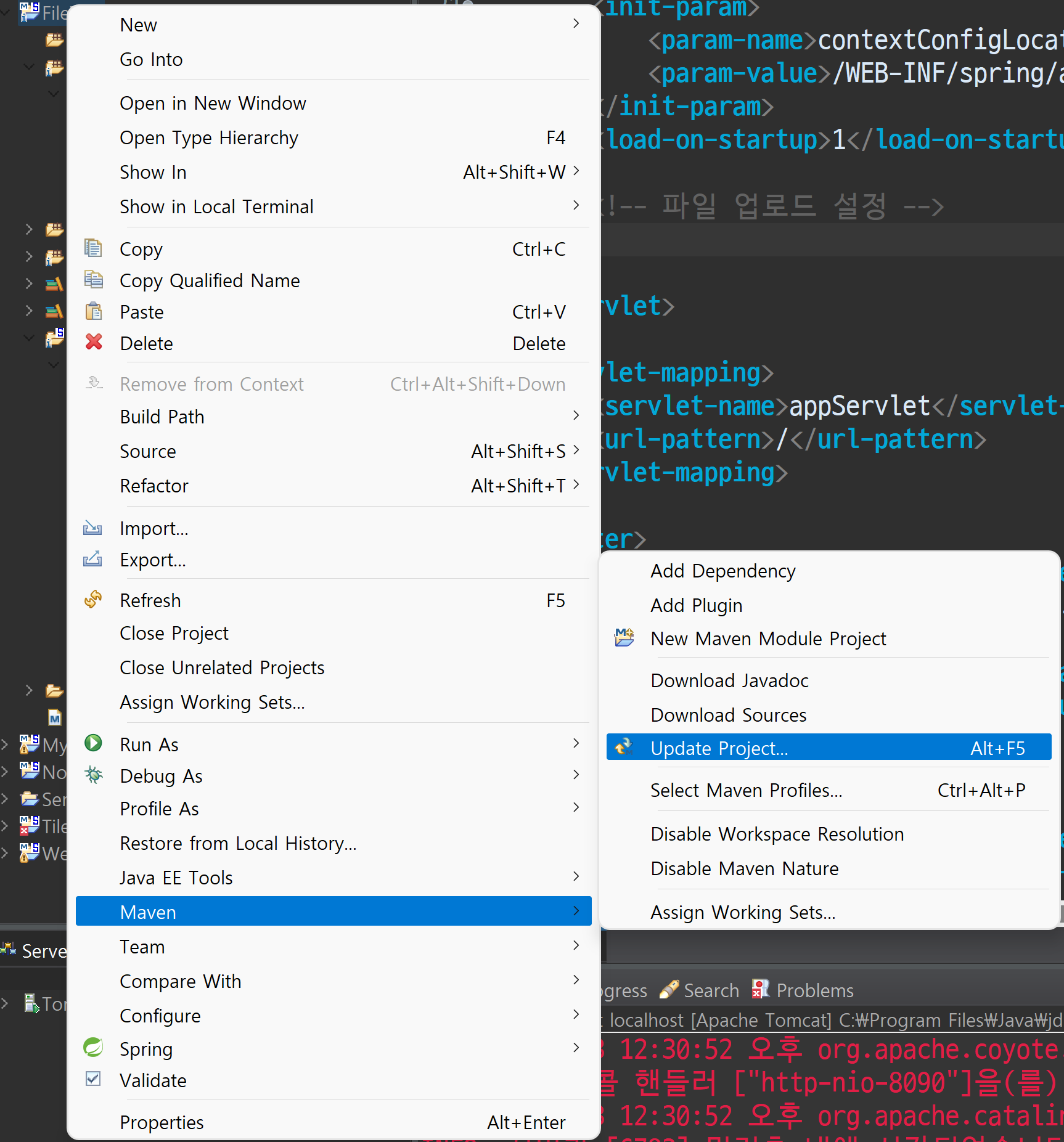
dependency를 추가했는데 적용되는 게 느리다면 Alt+F5를 눌러 프로젝트를 Update 한다.
web.xml
<?xml version="1.0" encoding="UTF-8"?>
<!-- <web-app version="2.5" xmlns="http://java.sun.com/xml/ns/javaee"
	xmlns:xsi="http://www.w3.org/2001/XMLSchema-instance"
	xsi:schemaLocation="http://java.sun.com/xml/ns/javaee https://java.sun.com/xml/ns/javaee/web-app_2_5.xsd"> -->

<web-app xmlns:xsi="http://www.w3.org/2001/XMLSchema-instance" xmlns="http://xmlns.jcp.org/xml/ns/javaee" xsi:schemaLocation="http://xmlns.jcp.org/xml/ns/javaee http://xmlns.jcp.org/xml/ns/javaee/web-app_3_1.xsd" id="WebApp_ID" version="3.1">

	<!-- The definition of the Root Spring Container shared by all Servlets
		and Filters -->
	<context-param>
		<param-name>contextConfigLocation</param-name>
		<param-value>/WEB-INF/spring/root-context.xml</param-value>
	</context-param>

	<!-- Creates the Spring Container shared by all Servlets and Filters -->
	<listener>
		<listener-class>org.springframework.web.context.ContextLoaderListener</listener-class>
	</listener>

	<!-- Processes application requests -->
	<servlet>
		<servlet-name>appServlet</servlet-name>
		<servlet-class>org.springframework.web.servlet.DispatcherServlet</servlet-class>
		<init-param>
			<param-name>contextConfigLocation</param-name>
			<param-value>/WEB-INF/spring/appServlet/servlet-context.xml</param-value>
		</init-param>
		<load-on-startup>1</load-on-startup>

		<!-- 파일 업로드 설정 -->
		<multipart-config>

			<!-- 임시 폴더 지정(C:\class\code\spring\temp) -->
			<location>C:\\class\\code\\spring\\temp</location>

			<!-- 파일 최대 크기 10MB -->
			<max-file-size>10485760</max-file-size>

			<!-- 한번에 업로드할 수 있는 파일들의 총 크기 합 50MB -->
			<max-request-size>52428800</max-request-size>

			<!-- 업로드에 사용할 메모리 용량 10MB -->
			<file-size-threshold>10485760</file-size-threshold>

		</multipart-config>

	</servlet>

	<servlet-mapping>
		<servlet-name>appServlet</servlet-name>
		<url-pattern>/</url-pattern>
	</servlet-mapping>

	<filter>
		<filter-name>encodingFilter</filter-name>
		<filter-class>org.springframework.web.filter.CharacterEncodingFilter</filter-class>
		<init-param>
			<param-name>encoding</param-name>
			<param-value>UTF-8</param-value>
		</init-param>
	</filter>
	<filter-mapping>
		<filter-name>encodingFilter</filter-name>
		<servlet-name>appServlet</servlet-name>
	</filter-mapping>

</web-app>
cos.jar를 사용해도 되긴 하지만, 오래된 라이브러리이기 때문에 Spring 진영에서는 안정성 때문에 commons-io를 많이 사용한다.
서블릿 버전이 2. 대이면 사용이 안 되기 때문에 3.0으로 올려 주었고, 업로드 폴더가 아닌 임시 폴더를 만들어서 업로드 설정을 했다.
servlet-context.xml
<?xml version="1.0" encoding="UTF-8"?>
<beans:beans xmlns="http://www.springframework.org/schema/mvc"
	xmlns:xsi="http://www.w3.org/2001/XMLSchema-instance"
	xmlns:beans="http://www.springframework.org/schema/beans"
	xmlns:context="http://www.springframework.org/schema/context"
	xsi:schemaLocation="http://www.springframework.org/schema/mvc https://www.springframework.org/schema/mvc/spring-mvc.xsd
		http://www.springframework.org/schema/beans https://www.springframework.org/schema/beans/spring-beans.xsd
		http://www.springframework.org/schema/context https://www.springframework.org/schema/context/spring-context.xsd">

	<!-- DispatcherServlet Context: defines this servlet's request-processing infrastructure -->

	<!-- Enables the Spring MVC @Controller programming model -->
	<annotation-driven />

	<!-- Handles HTTP GET requests for /resources/** by efficiently serving up static resources in the ${webappRoot}/resources directory -->
	<resources mapping="/resources/**" location="/resources/" />

	<!-- Resolves views selected for rendering by @Controllers to .jsp resources in the /WEB-INF/views directory -->
	<beans:bean class="org.springframework.web.servlet.view.InternalResourceViewResolver">
		<beans:property name="prefix" value="/WEB-INF/views/" />
		<beans:property name="suffix" value=".jsp" />
	</beans:bean>

	<context:component-scan base-package="com.test.file" />
	<context:component-scan base-package="com.test.controller" />

	<!-- 파일 업로드 -->
	<beans:bean id="multipartResolver" class="org.springframework.web.multipart.support.StandardServletMultipartResolver"></beans:bean>

</beans:beans>
id는 본래 개발자의 마음대로 줄 수 있지만, 파일 업로드에 한해서는 예약되어 있는 id를 사용해야 한다.
root-context.xml
<?xml version="1.0" encoding="UTF-8"?>
<beans xmlns="http://www.springframework.org/schema/beans"
	xmlns:xsi="http://www.w3.org/2001/XMLSchema-instance"
	xsi:schemaLocation="http://www.springframework.org/schema/beans https://www.springframework.org/schema/beans/spring-beans.xsd">

	<!-- Root Context: defines shared resources visible to all other web components -->
	<bean id="hikariConfig" class="com.zaxxer.hikari.HikariConfig">
		<property name="driverClassName"
			value="net.sf.log4jdbc.sql.jdbcapi.DriverSpy"></property>
		<property name="jdbcUrl"
			value="jdbc:log4jdbc:oracle:thin:@localhost:1521:xe"></property>
		<property name="username" value="hr"></property>
		<property name="password" value="java1234"></property>
	</bean>

	<bean id="dataSource" class="com.zaxxer.hikari.HikariDataSource"
		destroy-method="close">
		<constructor-arg ref="hikariConfig"></constructor-arg>
	</bean>

	<bean id="sessionfactory"
		class="org.mybatis.spring.SqlSessionFactoryBean">
		<property name="dataSource" ref="dataSource"></property>
		<property name="mapperLocations"
			value="classpath*:mapper/*.xml"></property>
	</bean>

	<bean class="org.mybatis.spring.SqlSessionTemplate">
		<constructor-arg ref="sessionfactory"></constructor-arg>
	</bean>

</beans>
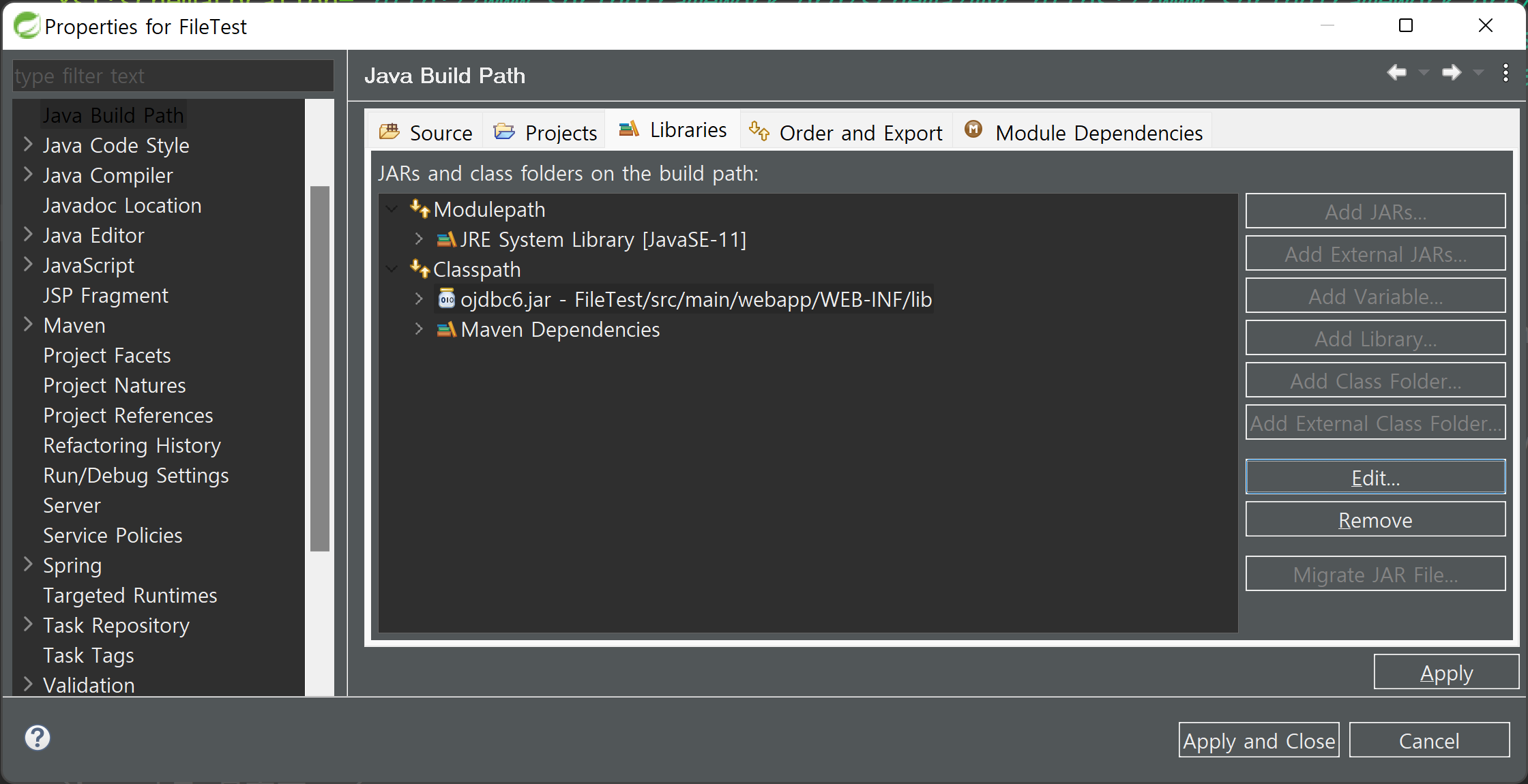
ojdbc
[JDBC] JDBC란? (Java Database Connectivity)
🍁JDBC JDBC는 자바 프로그램과 데이터베이스(오라클)를 연결시켜 주는 자바 API(응용 프로그래밍 인터페이스)이다. JDBC는 데이터베이스에서 자료를 쿼리를 만들거나 업데이트하는 방법을 제공한
isaac-christian.tistory.com
위 글을 참고하여 ojdbc 라이브러리를 참조하도록 한다.
Listener refused the connection with the following error: ORA-12505, TNS:listener does not currently know of SID given in connect descriptor
Oracle 데이터베이스의 SID (System ID)가 올바르게 설정되지 않았거나, Listener에서 해당 SID를 인식하지 못하는 경우 이와 같은 발생할 수 있다.
오라클 서버가 꺼져 있지 않은지 확인해 보도록 하자.
🌿파일 입출력 구현
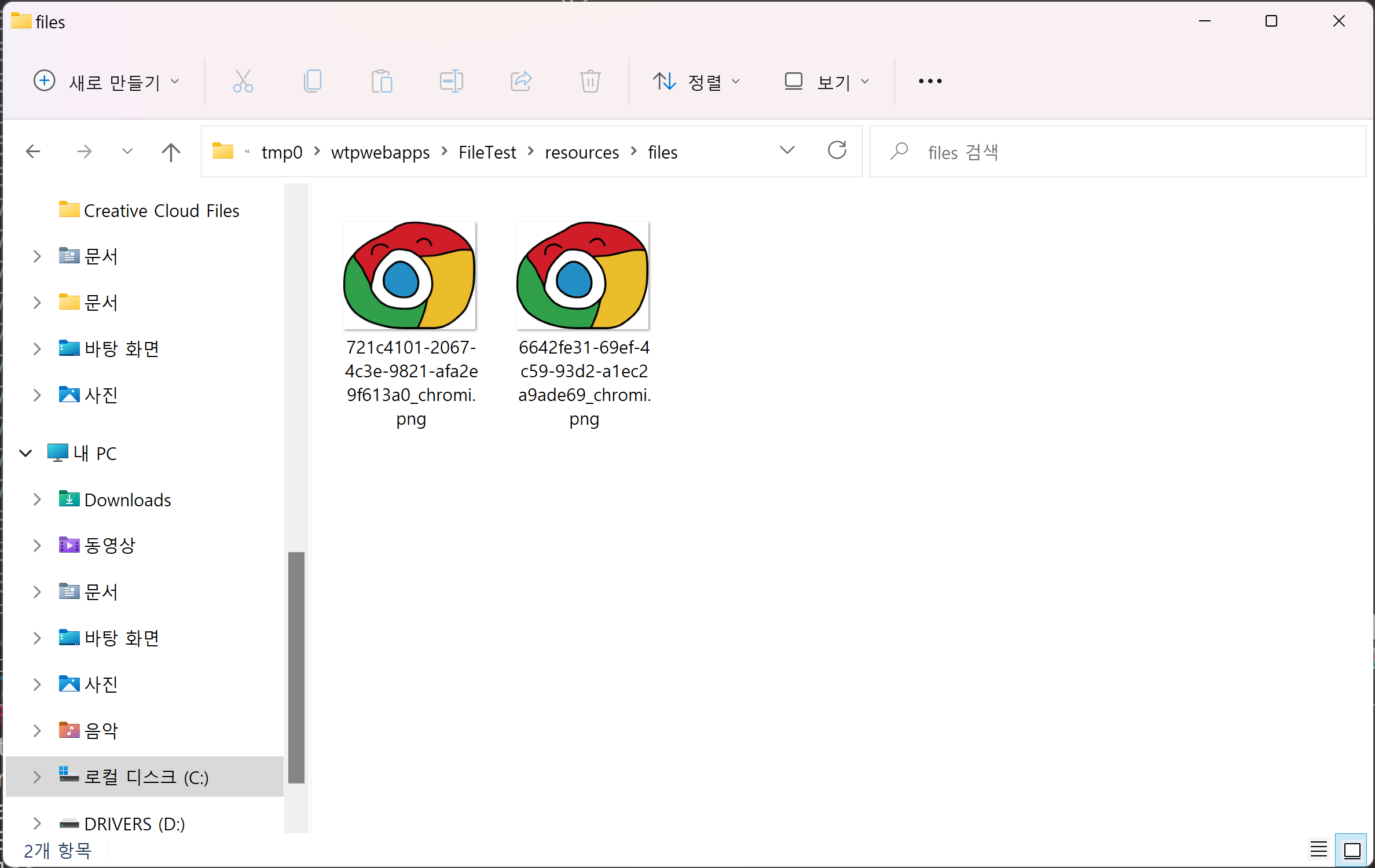
webapp의 resources 폴더에 첨부 파일을 저장할 files 폴더를 생성하였다.
FileController
package com.test.file.controller;

import java.io.File;
import java.io.UnsupportedEncodingException;
import java.net.URLEncoder;
import java.util.UUID;

import javax.servlet.http.HttpServletRequest;

import org.springframework.core.io.FileSystemResource;
import org.springframework.core.io.Resource;
import org.springframework.http.HttpHeaders;
import org.springframework.http.HttpStatus;
import org.springframework.http.MediaType;
import org.springframework.http.ResponseEntity;
import org.springframework.stereotype.Controller;
import org.springframework.ui.Model;
import org.springframework.web.bind.annotation.GetMapping;
import org.springframework.web.bind.annotation.PostMapping;
import org.springframework.web.bind.annotation.RequestHeader;
import org.springframework.web.bind.annotation.ResponseBody;
import org.springframework.web.multipart.MultipartFile;

@Controller
public class FileController {

	@GetMapping(value = "/add.do")
	public String add(Model model) {

		return "add";
	}

	@PostMapping(value = "/addok.do")
	public String addok(Model model, String txt, MultipartFile attach, HttpServletRequest req) {

		//System.out.println(txt);

		System.out.println(attach.getName()); //<input type="file" name="attach
		System.out.println(attach.getOriginalFilename()); //업로드 파일명
		System.out.println(attach.getContentType()); //MIME
		System.out.println(attach.getSize()); //사이즈(Byte)
		System.out.println(attach.isEmpty()); //존재 유무

		try {

			//1. 파일을 업로드 폴더에 이동하기
			//2. 파일명 중복 방지
			//	a. 숫자 붙이기
			//	b. 고유 접두어 붙이기
			//		- 시간_파일명
			//		- 난수_파일명
			//	c. UUID(Universally Unique ID)
			//		- 네트워크상에서 고유성이 보장되는 ID를 만들기 위한 표준
			//		- 시간 + 난수 조합

			//System.out.println(System.nanoTime() + "_" + attach.getOriginalFilename());

			//highlight.zip

			//21743813459200_highlight.zip
			//21743813459345_highlight.zip

			UUID uuid = UUID.randomUUID();
			System.out.println(uuid);

			//1a9c71e9-54e8-4527-94cb-559c1dc734e6_파일명

			String path = req.getRealPath("/resources/files");
			System.out.println(path);

	        //저장할 폴더가 없을 경우 생성
	        File directory = new File(path);
	        if (!directory.exists()) {
	            directory.mkdirs();
	        }

			File file = new File(path + "\\" + uuid + "_" + attach.getOriginalFilename());

			//임시 폴더 > (이동) > files 폴더
			attach.transferTo(file);

			model.addAttribute("txt", txt);
			model.addAttribute("filename", uuid + "_" + attach.getOriginalFilename());
			model.addAttribute("orgfilename", attach.getOriginalFilename());

		} catch (Exception e) {
			e.printStackTrace();
		}

		return "addok";
	}

	@GetMapping(value = "/download.do", produces = MediaType.APPLICATION_OCTET_STREAM_VALUE)
	@ResponseBody
	public ResponseEntity<Resource> downloadFile(@RequestHeader("User-Agent") String userAgent, String filename, HttpServletRequest req) {

		String path = req.getRealPath("/resources/files");
		Resource resource = new FileSystemResource(path + "\\" + filename);

		if (resource.exists() == false) {
			return new ResponseEntity<>(HttpStatus.NOT_FOUND);
		}

		String resourceName = resource.getFilename();

		// remove UUID
		String resourceOriginalName = resourceName.substring(resourceName.indexOf("_") + 1);

		HttpHeaders headers = new HttpHeaders();
		try {

			String downloadName = null;

			if (userAgent.contains("Trident")) {
				downloadName = URLEncoder.encode(resourceOriginalName, "UTF-8").replaceAll("\\+", " ");
			} else if (userAgent.contains("Edge")) {
				downloadName = URLEncoder.encode(resourceOriginalName, "UTF-8");
			} else {
				downloadName = new String(resourceOriginalName.getBytes("UTF-8"), "ISO-8859-1");
			}

			headers.add("Content-Disposition", "attachment; filename=" + downloadName);

		} catch (UnsupportedEncodingException e) {
			e.printStackTrace();
		}

		return new ResponseEntity<Resource>(resource, headers, HttpStatus.OK);
	}

}
MultipartFile의 매개변수 이름을 html name 이름과 맞춰 주어야 한다.
업로드 파일의 정보
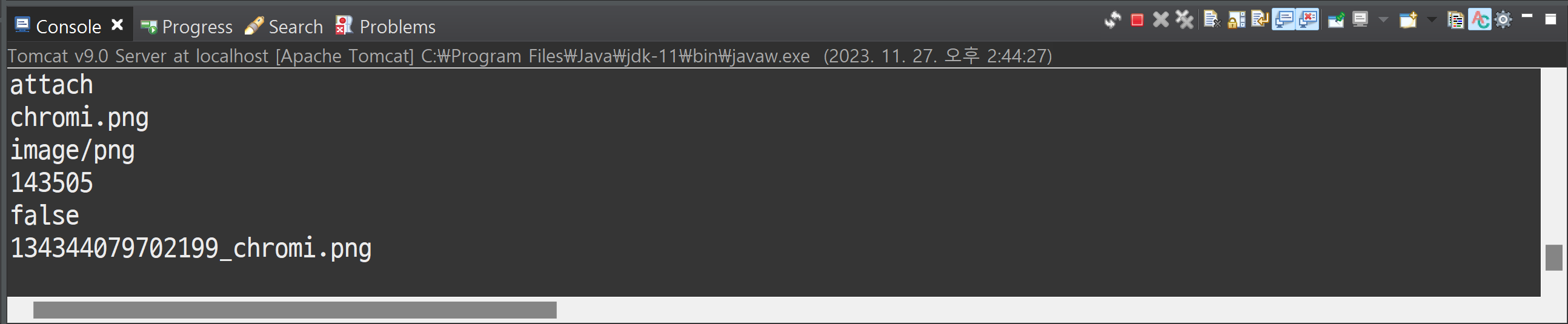
System.out.println(attach.getName()); //<input type="file" name="attach"... 태그의 네임값
System.out.println(attach.getOriginalFilename()); //업로드 파일명
System.out.println(attach.getContentType()); //MIME
System.out.println(attach.getSize()); //사이즈(Byte)
System.out.println(attach.isEmpty()); //존재 유무
try-catch문 내의 작업
1. 파일을 업로드 폴더에 이동하기
2. 파일명 중복 방지
a. 숫자 붙이기 (chromi1, chrmoi2..)
b. 고유 접두어 붙이기
- 시간_파일명
- 난수_파일명
c. UUID(Universally Unique ID)
- 전 세계 네트워크 상에서 고유성이 보장되는 ID를 만들기 위한 표준
- 시간 + 난수 조합
시간_파일명
System.out.println(System.nanoTime() + "_" + attach.getOriginalFilename());겹치지 않을 만한 숫자를 붙여서 첨부 파일을 유일하게 만드는 기법이 편리하기 때문에 많이 사용한다.
UUID
UUID uuid = UUID.randomUUID();
System.out.println(uuid); //18d47b4b-8928-4c5b-bc91-9135892fc68e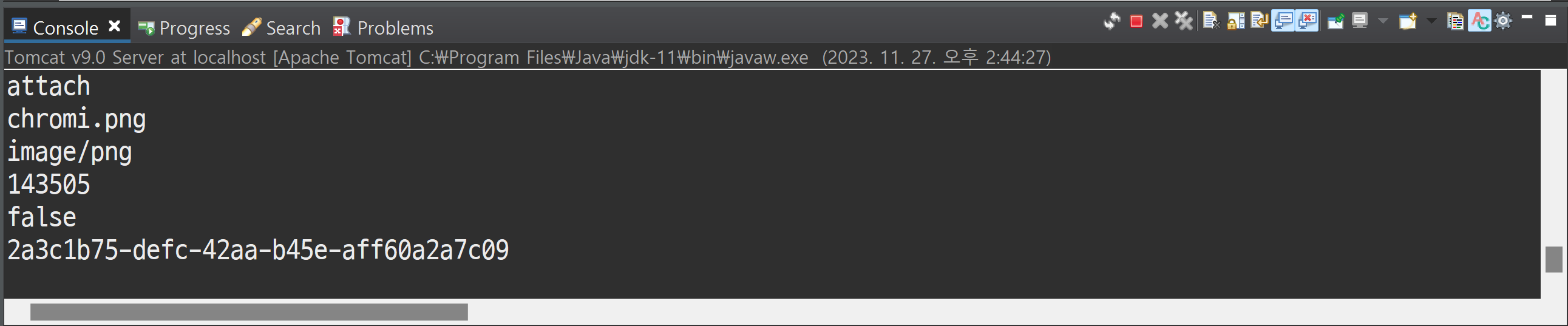
난수로 생성된 문자를 파일명에 붙여서 "18d47b4b-8928-4c5b-bc91-9135892fc68e_파일명"과 같이 사용한다.
add.jsp
<%@ page language="java" contentType="text/html; charset=UTF-8"
    pageEncoding="UTF-8"%>
<%@ taglib prefix="c" uri="http://java.sun.com/jsp/jstl/core" %>
<!DOCTYPE html>
<html>
<head>
<meta charset="UTF-8">
<title>Example</title>
<link rel="stylesheet" href="https://me2.do/5BvBFJ57">
<style>

</style>
</head>
<body>
	<!-- add.jsp -->
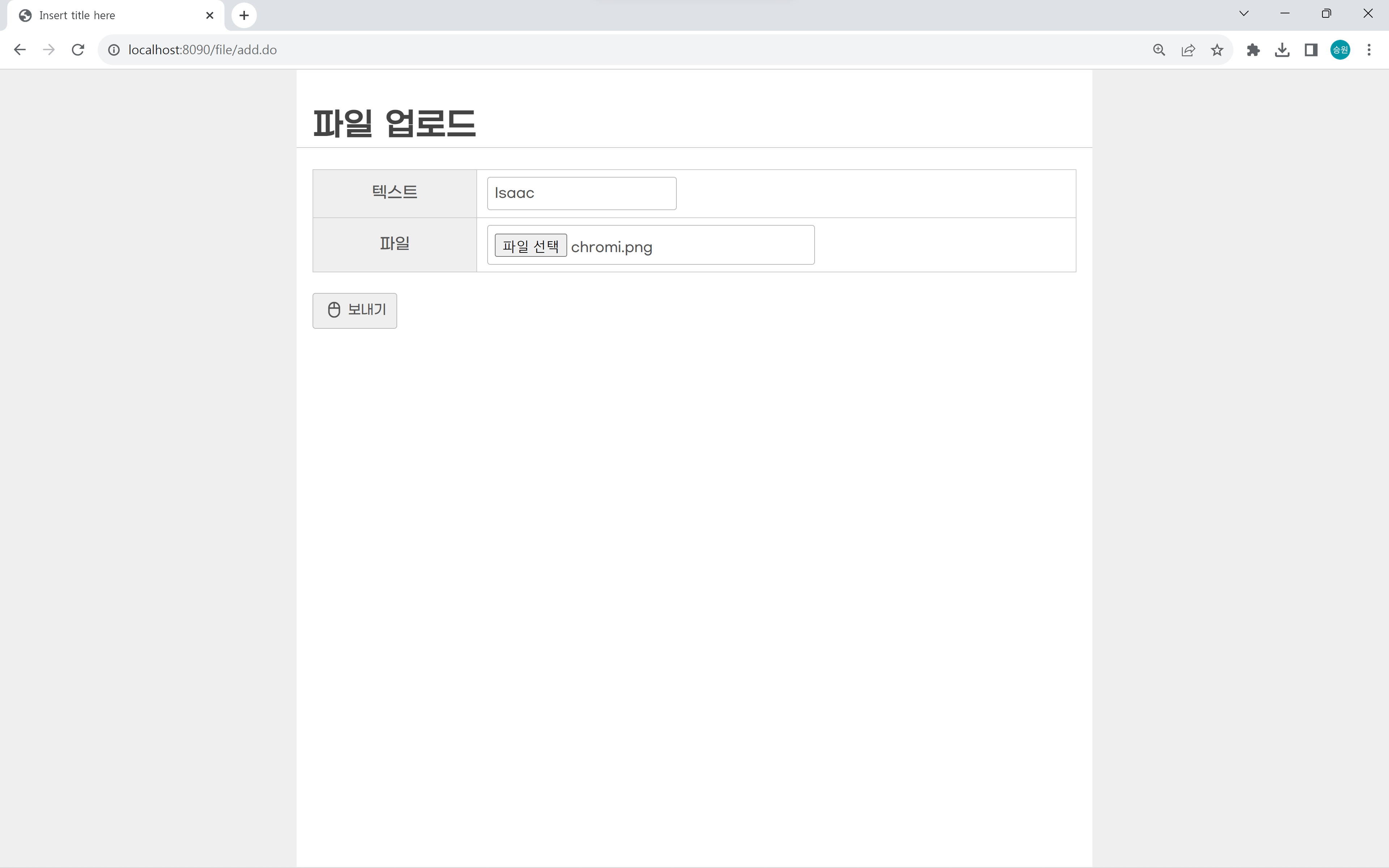
	<h1>파일 업로드</h1>

	<form method="POST" action="/file/addok.do" enctype="multipart/form-data">
	<table class="vertical">
		<tr>
			<th>텍스트</th>
			<td><input type="text" name="txt" value="Isaac"></td>
		</tr>
		<tr>
			<th>파일</th>
			<td><input type="file" name="attach"></td>
		</tr>
	</table>
	<div>
		<button>보내기</button>
	</div>
	</form>

	<script src="https://code.jquery.com/jquery-1.12.4.js"></script>
	<script>

	</script>
</body>
</html>
addok.jsp
<%@ page language="java" contentType="text/html; charset=UTF-8"
    pageEncoding="UTF-8"%>
<%@ taglib prefix="c" uri="http://java.sun.com/jsp/jstl/core" %>
<!DOCTYPE html>
<html>
<head>
<meta charset="UTF-8">
<title>Example</title>
<link rel="stylesheet" href="https://me2.do/5BvBFJ57">
<style>

</style>
</head>
<body>
	<!-- addok.jsp -->
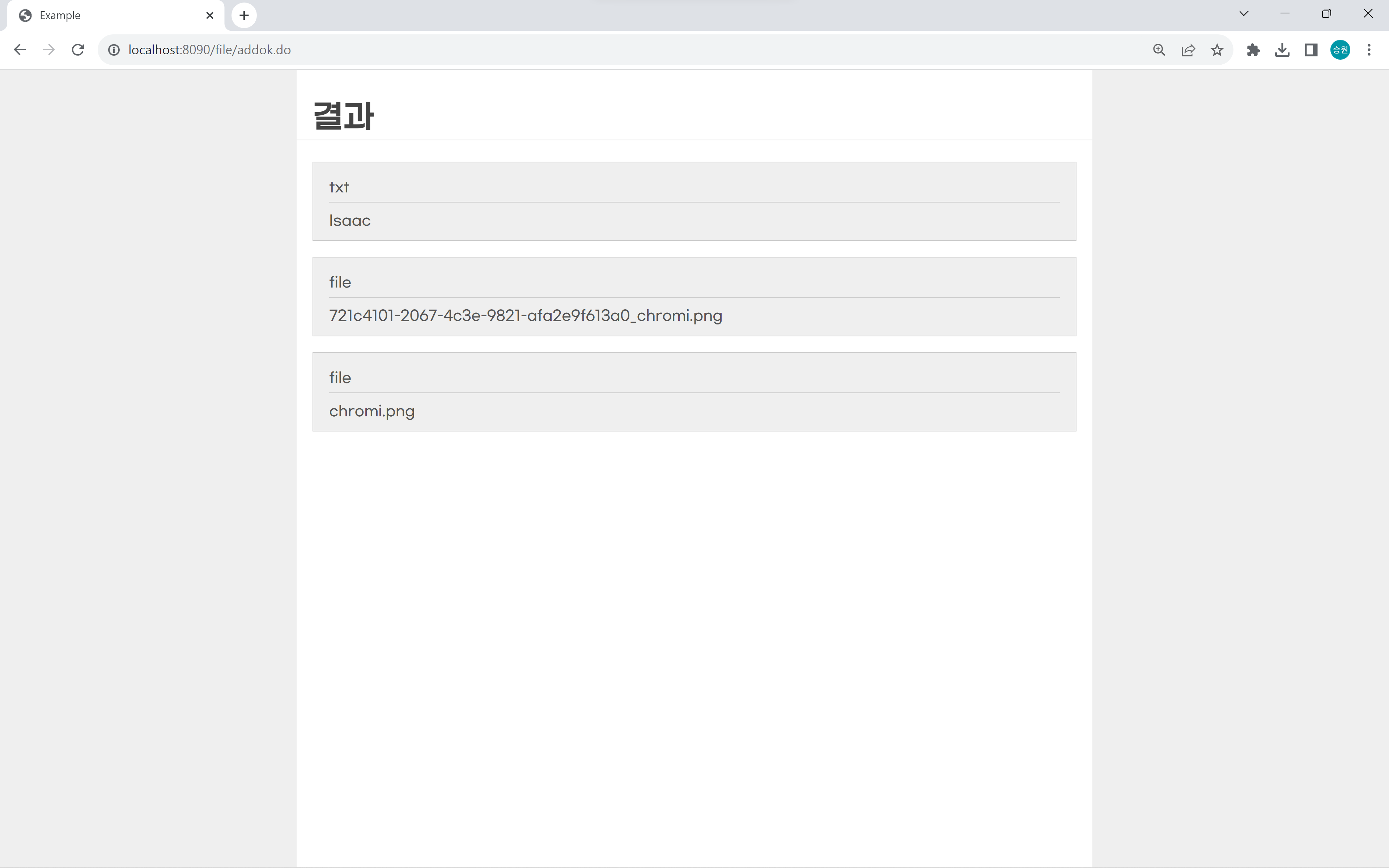
	<h1>결과</h1>

	<div class="message" title="txt">${txt}</div>

	<div class="message" title="file">
		<a href="/file/resources/files/${filename}" download>${filename}</a>
	</div>

	<div class="message" title="file">
		<a href="/file/download.do?filename=${filename}">${orgfilename}</a>
	</div>

	<script src="https://code.jquery.com/jquery-1.12.4.js"></script>
	<script>

	</script>
</body>
</html>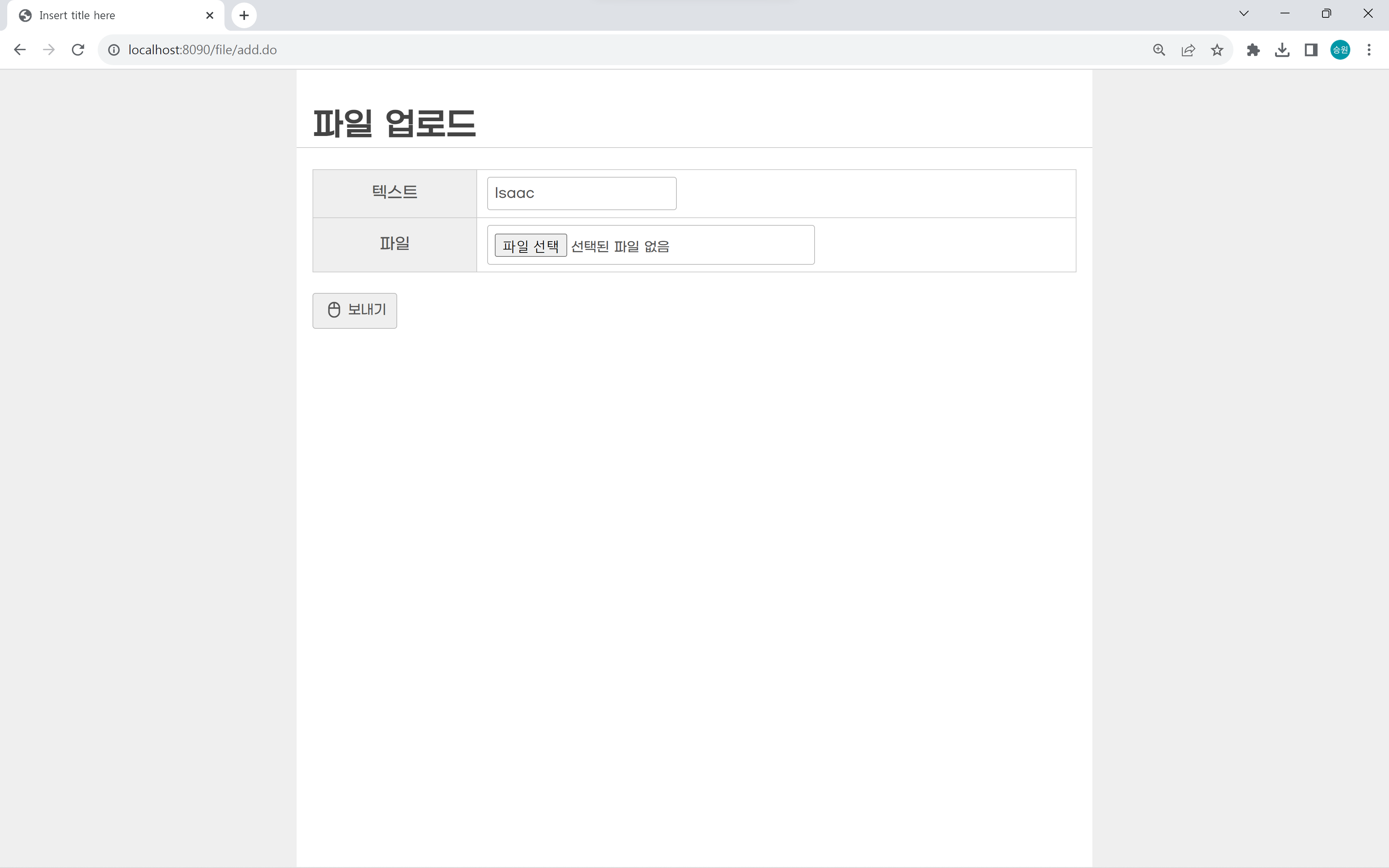
- C:\Class\code\spring\.metadata\.plugins\org.eclipse.wst.server.core\tmp0\wtpwebapps\FileTest\resources\files